Category: Article

  • iPhone 14 2022: Powerful and Innovative Technology

    iPhone 14 2022: Powerful and Innovative Technology

    Apple released a new iPhone. It is an iPhone 14. This iPhone comes in 4 types. iPhone 14, iPhone 14 Pro, iPhone 14 Pro Max, and 14 Plus. In this iPhone, there are many updates, they also add innovative features

    Do you want to know the details of the iPhone 14 leaks.

    What’s New on iPhone 14?

    1. Design

    The first point of iPhone 14. iPhone 14 design doesn’t make a big change. You can compare the iPhone 14 vs 13. The design is almost the same as the iPhone 13. 

    But, for iPhone 14 Pro and Pro Max, it has a new design. iPhone 14 still has the notch on the top. Like the iPhone 13. But, in the Pro series, they replace it. It is only a camera and Dynamic Island. This makes big news for iPhone 14. Very fresh and attractive technology.

    For the material, it is almost the same. Aluminum and glass in front and back. For the size, iPhone 14 has 6.1 inches. iPhone 14 Plus has 6.7 inches in size. It is the same size as iPhone 14 Pro and Pro Max.

    2. Performance

    iPhone 14 still uses the same chip as iPhone 13, A15 Bionic chip, with a dash of good news where they fix the overheating issues, so you don’t need to worry about your iPhone overheating while playing a game or opening several applications at the same time. Besides that, they also use IP 68 water resistance; another interesting feature.

    From the benchmark, iPhone 14 is a little bit higher than iPhone 13. 1,727 single-core and 4,553 multicore, with the graphic performance of 11,531 and 69 fps. With this fps it allows you to export 4k 1080p video within only 28 seconds. More efficient, right?

    3. Display

    iPhone 14 has an OLED Super Retina XDR with the ratio of two million to 1. For iPhone 14, the resolution is 2532x 1170, while iPhone 14 Plus has 2778x 1284 resolution, similar to iPhone 14 Pro and Pro Max. 

    Because of its True Tone feature, the colors on the iPhone 14 are more precise. Additionally, it has excellent white balance and delivers wonderful, rich colors. You can also enjoy the wider viewing angle, and Ceramic Shield helps to protect the body too though. 

    4. Camera

    Both the front and back cameras offer excellent results. The main camera of the iPhone 14 boasts excellent low-light capabilities, with a 2.5x increase in sensitivity and has up to twice as much low light for ultra-wide.

    Additionally, the iPhone 14 includes True Depth features, f/1.9 focusing, and a brighter image. They offer a photographic function called Photo Engine that produces photos that are more detailed and authentic.

    Other improvements that have been added to the iPhone 14 camera are including a 5x digital zoom. Even while the results from the iPhone zoom camera are less impressive than those from Android, the image detail and brightness is still exceptional.

    5. Video

    iPhone 14 camera has more steady camera features. It is called Action mode. Even though you take a video while running. The results are still smooth. They also have a great cinematic mode. This makes the video look like a movie. The detail, textures, colors, brightness, etc.

    iPhone 14 is the first iPhone that has an 8k video record. The 48mp camera is also excellent. It makes the video more detailed and natural. The other video feature is HDR recording. It also has ProRes, slow-mo video, and time-lapse. All these features give you a great experience.

    6. Battery life and charging

    Action mode, a more stabilized camera feature, is also included in the iPhone 14. The results are nevertheless flawless even while you’re jogging while recording the video. They also feature a fantastic cinematic mode that enhances the video’s quality, colors, tones, brightness, etc. and creates the impression like a movie.

    With the help of a spectacular 48MP camera, the iPhone 14 is the first iPhone to be able to record 8k video, making the movie more realistic and detailed. The other video feature is HDR recording using ProRes, which is suitable for time-lapse and slow-motion videos. You will enjoy exploring all of these features.

    7. Dynamic islands

    Considering that they are regarded to be the pioneers of this technology, this is the most media phenomena of the iPhone 14 thus far. With this feature, they completely remove the notch. It works with the Pro and Max models of the iPhone 14.

    It serves as a sort of bubble at the top of the screen which can be used to play music, receive phone calls, etc. Nearly all apps can make use of this feature for notifications, alerts, etc. Apple also refers to it as an Interactive Display.

    8. Emergency SOS call via satellite

    The iPhone 14 is the first product to have this, which is also Apple’s first innovation.

    Because Apple deploys a satellite for this emergency SOS, you can make phone calls anywhere even though you may not have an internet connection.

    9. Crash detection

    This is yet another intriguing Apple invention that is only available in the iPhone 14. Once the crash has been detected, your iPhone will phone 911 as well as any emergency contacts you have added to your contact book. As nothing more than a result, it immediately notifies your family and friends.

    Protect your iPhone with iPhone skin

    Even though the iPhone is made of metal and also has a ceramic shield, you still need the iPhone skins to provide your phone extra protection.

    There are many different sorts of iPhone skins available at exacoat.com, which is an incredible place to get phone skins. You can find your iPhone skins on our website today and select your favorite one among our high-quality materials products.
  • MacBook Pro or MacBook Air? Which One is Better?

    MacBook Pro or MacBook Air? Which One is Better?

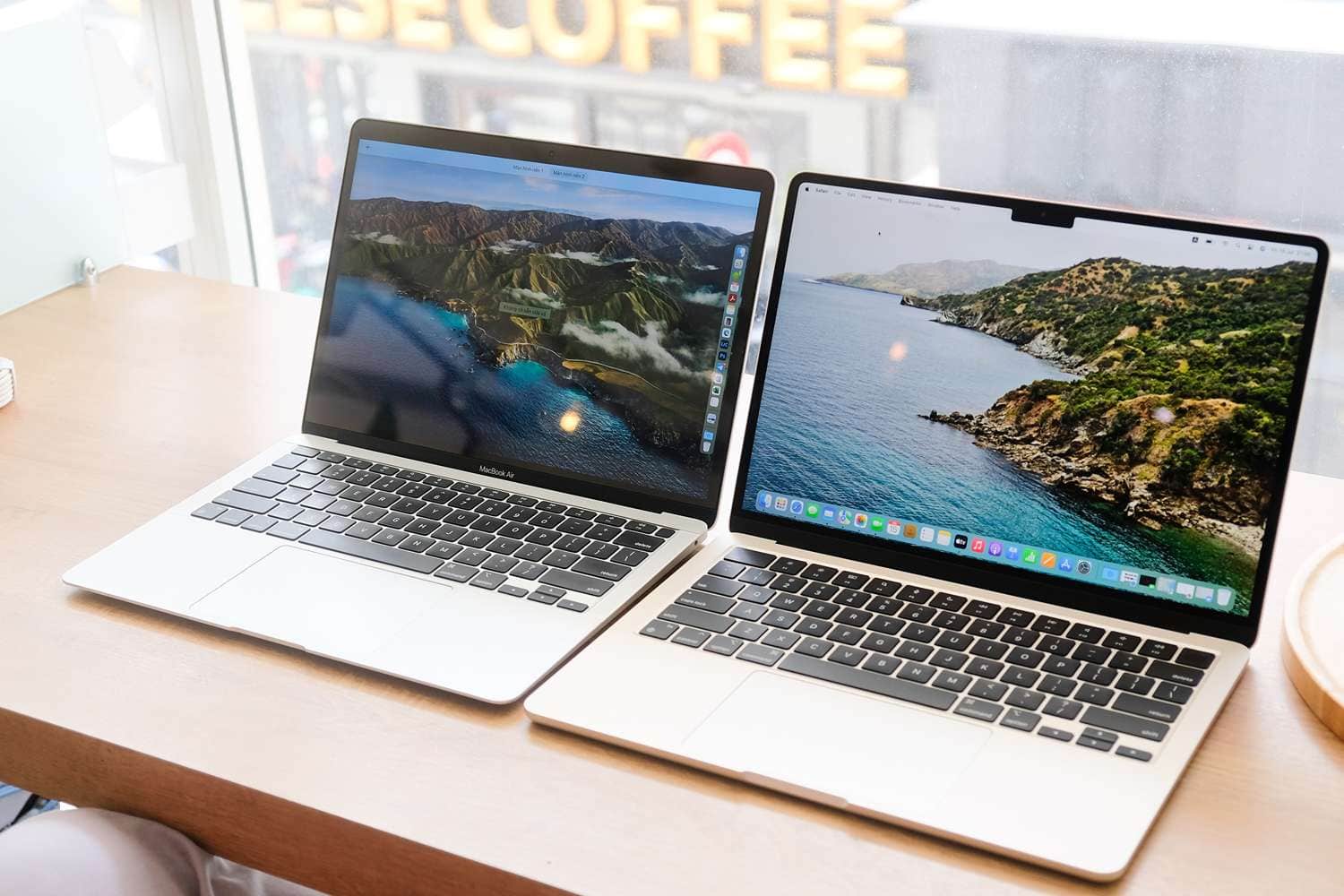
    What is the difference between MacBook Air and Pro? In this article, we compare MacBook Air vs MacBook Pro to help you understand before deciding to buy one. 

    MacBook Pro vs MacBook Air

    1. Performance

    Looking at the performance score, MacBook Air M2 2022 is slightly winning with 8,919 points compared to MacBook Pro M2 with 8,911 points. 

    With their 2 types of processors, M1 and M2, MacBook Air M1 has 5,962 scores in Benchmark, making it bigger than MacBook Pro M1..

    Suppose you play the game with a high setting, say Rise of The Tomb Raider,  the results are very unexpected. MacBook Pro M1 Pro and M1 Max are still the winners in performance. In the MacBook Air M1, it is only 29 fps, but in M1 Pro and M1 Max they come with more than 40 fps.

    2. Design

    MacBook Pro M2 2022 design is almost the same as the M1 but with slimmer bezels. MacBook Air has a tapered-wedge design, making it a unique design of the Air series.

    MacBook Pro is available in Space Gray and Silver colors while Air series available in Midnight, Gray, Silver, and Starlight. MacBook Air M2 also has thinner bezels with larger screen effect because it only has a notch in the camera. This is a new design for the Air series. 

    3. Display

    When you compare MacBook Air vs MacBook Pro display, it doesn’t make a big difference. MacBook Air and MacBook Pro 13 inches have Retina display to generate a sharper color  and more vibrant display. With the latest True Tone feature in Air, it can change the display based on the lighting conditions. 

    MacBook Pro M1 Pro and Max have a brighter screen thanks to its Liquid Retina XDR and OLED panels. The screen is also larger. 14 inches and 16 inches which make it very great for doing tasks, watching a movie, editing, playing a game, etc.

    4. Camera

    MacBook Pro M2 only has a 720p camera. It is considered less favorable for some people whileM1 Pro and Max have bigger pixels. It is also the same as the MacBook Air M1. MacBook Air M2 has a 1080p camera.

    When you do FaceTime or video conference, 1080p is very excellent. That is why MacBook Air M2 with its 1080p camera comes as the winner here with a more detailed, sharp, and great resolution. Which is better, MacBook Air vs MacBook Pro camera? Even though both are still  providing a great resolution, 1080p results can’t lie

    5. Editing performance

    Creative people need great editing tools performance. MacBook M1 Pro and Max are listed as a great choice for editing. You can easily export 4k 1080p video and the results are very excellent. To do such a task, MacBook Pro M1 Pro and Max only take around 4 minutes. The second is the MacBook Pro M2 with 6:51 minutes. MacBook Pro M1 lasts 7:44 minutes. The last is the Air series. Both of them spend around 7 minutes. It is very unexpected.

    6. Battery life

    MacBook Pro M2 can operate for 18 hours thanks to its M2 chip which brings longer battery life. The New M2 MacBook also has MagSafe charging which allows you to charge the MacBook without cables. The second place for battery life is the M1 Pro which can stand for up to 16 hours. The last is the MacBook Pro 16 inches that has 10 hours battery life.

    7. Audio

    Almost all MacBooks have a great audio system but the best audio comes from the 14 and 16 inches MacBook Pro with their six-speaker setups. This is only available in these two MacBooks. Both of them support Dolby Atmos that offer you more bass and clearer audio sound. The MacBook Pro M2 also has a great audio system but it is still a little bit behind the MacBook Pro 14 and 16 inches.

    8. Ports

    If you need a lot of ports, the answer is almost the same. The MacBook Pro 14 inches and 16 inches will be the best options for you with their three Thunderbolt ports, HDMI, MagSafe, and SD Card slot. These features are not available in other MacBooks.

    Other MacBooks usually only have 2 ports where they don’t provide an SD Card and HDMI port. In case you need to plug in an HDMI, you need to have an extension port to connect it. 

    9. Features

    MacBook Pro M2 has a Touch Bar feature that is used to slide photos, edit, receive phone calls, etc. In other words, it will help you to do some activity easily because of its position that is easy to reach, just on the top of the keyboard. The Touch Bar feature is clearly a winning point for the MacBook Pro since the MacBook Air doesn’t have it.

    10. Price

    At this point, the MacBook Air M1 is still the cheapest MacBook compared to the Pro series. The price starts from $999 for a great MacBook M1 Air. The second place is the MacBook Air M2 that starts from $1,199. 

    Because of its upgraded features, the MacBook Pro has a higher price that starts with M2 Pro of $ 1,299, followed by the MacBook Pro 14 inches starting from $1,999, and lastly MacBook Pro 16 inches starts from $2,499. 

    MacBook skin

    Whichever MacBook type that you decide to purchase, it’s always good to protect the laptop with a special MacBook skin from exacoat.com.

  • Simple Ways to Protect Your Phone from Scratches

    Simple Ways to Protect Your Phone from Scratches

    When they are brand new, modern cell phones will have a stunning appearance. However over time, the gadget is susceptible to severe and little harm. For example, the screen may break from a drop, scratches, damages. 

    To increase the value of your phone in case you decide to sell it later, it is always a good idea to keep your screen in good shape. Used smartphones with significant damage lose weight and its value; even little screen scratches can cause problems.

    Keep Your Phone and Keys Separate

    Keys are considered a no-no when it comes to screen scratches. Metal things you carry around cause most of the little scratches on your phone’s display. So how to protect your phone is to make sure to put your keys in a separate pocket before putting your phone in your purse or pocket. Additionally, we advise against keeping your phone next to pencils, loose cash, or other objects with metal clips. Instead, use a different zipper pocket in your bag.

    Cleanup Carefully

    You might occasionally need to wipe your screen. It’s tempting to massage it with your shirt or go for the closest cloth, but doing so can leave tiny traces on the screen. It would be best to use only microfiber cloths or the cloth included with your screen protector. If necessary, use a tiny drop of water on the fabric and rub the marks off very gently.

    Never clean your screen with a scrubber, a soaking wet towel, soap, or other cleaning product. Numerous cleaning supplies include minute granules; fluid entering your gadget could void the warranty and permanently harm the phone body.

    Invest In a Screen Protector

    Never think of a simple way of protecting a phone with only a Gorilla Glass screen and hoping it will not shatter. Although it may be more durable than a screen without Gorilla Glass, it will still accumulate unpleasant scratches on the surface if you’re not careful.

    Screen protectors are difficult to install. Let’s face it. But once they’re in the proper spot, your phone will shield from the worst damage, so it was well worth the trouble.

    When selecting a glass screen, ensure it almost reaches the case’s edges. If there is a space, look for one that is wider. Purchase a few protectors, so you have a backup in case you have trouble applying the first.

    Screen protectors should fit tightly against the screen without any bubbles underneath. It is worth a little time to get the perfect placement for preventing continuous damage from a grain of dirt or dust trapped near the screen.

    Mobile Skin Types You Should Know

    We can’t imagine modern life without mobile devices; they have taken on a life of their own. As a result, we must adorn our cherished belongings by every means. So, let’s now check out various phone type for phone skins that might offer your phone a new look.

    Mobile Skins

    The most popular method of how to protect phones today is to use phone skins. With phone skins, you can get rid of unsightly fingerprints while protecting your beloved gadgets from heat, scratches, grime, dust, and other abrasives.

    A common approach to customizing a phone while keeping it scratch-free is with phone skins. They frequently have a matte or glossy texture, are made of vinyl, and are available in various styles. In addition, they can be made quickly, cheaply, and elegantly.

    Hard Cases

    What precisely is a hard-case phone case, then? Specifically designed for a specific phone model, a tough phone case is a complex, shell-like case that snaps onto the phone. Typically, it extends to the phone’s four sides and rear.

    Since they are often lightweight and small, they don’t add bulk to the phone’s design. Complex phone cases are commonly offered in various colors, matte and gloss finishes, and clear and transparent materials.

    Phone Gel Cases

    TPU, also known as thermoplastic polyurethane. With various phone types for phone skins, TPU is a plastic-based polymer with flexibility, transparency, and potent resistance to oils and liquids. Various hues and a matte or glossy surface make gel phone cases thin and light.

    Thanks to its flexibility, gel cases are extremely strong and won’t break. In addition, the phone’s back and sides are completely shielded by gel covers, which is the most admirable feature.

    Silicas for phones

    Another popular mobile skin type is this one. Since silicone phone cases were produced for various phone types for phone skins models, many people have been familiar with them from the beginning of smartphones.

    They grasp the area they are placed on and are incredibly soft to the touch. As a result, they enjoyed a period of great popularity. The most typical substance used in modern silicone phone cases is “liquid silicone.”

    Durable Phone Cases

    In general, tough phone cases outlast traditional complex or gel cases in terms of durability. “tough” is a relative term because it depends on how tightened you want your phone case to be. In addition, these cases come in a range of shapes and sizes.

    Many people pick more complex phone casings for their jobs in the construction industry and other outdoor-based industries. They might have an open, reinforced, extra-strong shell case or a complete, hard shell that covers the device’s front.

    Advertising for tough phone cases typically states that they are protected for military drop tests up to 15 feet. These cases are generally a little heavier and bulkier than typical complex and gel phone cases due to these many characteristics.

    Wallet Cases

    They are frequently made of leather, mostly PU (polyurethane) leather, but they can also be found in genuine leather. These covers have a polycarbonate insert that the phone can fit into, and the leatherback can fold over the front of the phone.

    There are many ways to protect a phone from scratches or more severe damage. You can do some simple things to keep your phone looking good. Even if you don’t intend to resell it, it’s not a bad idea either. Few cell phone users regret not applying phone protectors to avoid scratches. 

  • Is It Important to Protect My iPhone Screen? Find Out the Reasons!

    Is It Important to Protect My iPhone Screen? Find Out the Reasons!

    In addition to being unattractive, a broken screen can make using an iPhone more challenging. Why do so many people question the necessity of using iPhone screen protection? Using a touchscreen directly, with nothing between your finger and the phone, is unmatched. The perfect level of tactile responsiveness has been designed for mobile phone screens. So why do we still need to protect the iPhone screen and jeopardize the responsiveness?

    Broken screens cost a lot of money to fix.

    If the screen of your iPhone shattered, you could repair the glass without replacing the entire device. Yet, because of the lamination technique used in contemporary screen technology, there is no gap between the screen and the material that it covers on.

    The visual quality is greatly improved, but you must replace the complete screen if the glass is broken or damaged. The combination has significantly increased the cost of replacing cracked device screens, which is likely that so many people are keeping their damaged phones. People then suddenly ask whether they need iPhone screen protection or not.

    Stunning Material for Smartphones

    Essential items initially: the material used in phone screens is highly durable. The new iPhones’ Ceramic Shield Glass and Corning’s Gorilla Glass are both very impactful and blemish. This material concludes that you don’t need iPhone screen protection.

    Just minerals can break these glasses since they are so complex. Metals are unlikely to leave a mark, like a keychain in your wallet. The glass on your iPhone is already more capable of withstanding regular use.

    Throughout using your phone, you might accumulate some scratched screens, but they often have little effect on how the panel feels or how things appear.

    Are iPhone Screen Protectors Required?

    Viral videos of iPhones being dropped from rooftops and run over by trucks but coming out undamaged. Although most iPhone mishaps usually result in minor flaws, scratched screens can cause more problems than you might anticipate.

    Even though there are many situations in which applying an iPhone screen protection is unnecessary, it doesn’t mean it’s still a bright idea to leave the screen unprotected. Protect Your iPhone using iPhone Skin

    After knowing the strength of the body and the iPhone’s glass, this gadget has an unquestionable quality. Therefore, using an iPhone screen protection is not urgently required, especially if the user is very good with the device.

    However, the use of security can still be an option. One protection for example is using an iPhone skin. The iPhone skin is more similar to a screen protector than the casing. But the skin is used to protect the back and sides of the body.

    Adding protection for your iPhone by using an iPhone skin is also quite simple. The following procedure can be applied to all iPhone types. You will need a cloth to wipe away dust or grease and a Hairdryer for perfect edges.

    Steps to Install the Correct Skin

    Skin is one of the most suitable gadget protectors if you like DIY things. The reason is that you must be able to install your cell phone skin after making a purchase.

    Adding protection for your iPhone by using an iPhone skin should be done careefully so that later it can provide more optimal protection for gadgets.

    1. Preparing the Skin and Cleaning the Stains on the Gadget

    The first thing you will have to do is prepare the skin that will be paired later. You must first make sure that your gadget is in a clean state.

    To clean it, use a microfiber cloth by gently rubbing it on the gadget until there are no stains or dust attached and also ensure that your device is switched-off.

    2. Remove the Skin Adhesive to Paste

    The skin is a protective device on the gadget that is shaped like a sticker, so being the next step, you can remove the adhesive part of the iPhone skin little by little. You do not immediately open the hole because later, it is feared that there will be dust attached.

    It must always be remembered that you have to be careful and also thorough so that the skin can stick in harmony in the gadget area. This carefulness will make the results of the skin patch on the gadget look nicer and neater.

    3. Press the Skin on the Surface of the Gadget

    If the skin is already attached, next, you have to press – press the skin into the surface of the gadget. Press gently so that the gaskin sticks firmly and correctly.

    You can press it from the very top using your fingertips slowly. Do this method repeatedly until you are sure that the skin is completely attached. To ensure there are no creases, you can use a hair dryer.

    4. Finishing Process

    This finishing process is required if the skin is completely installed on your gadget. For example, you are tidying up the installation and cleaning the remnants of the structure. Adding protection for your iPhone by using an iPhone skin is almost the same feeling when installing regular stickers.

    Things to Look for When Buying an iPhone Skin

    Before you decide to add an iPhone skin, there are several things that you must always pay attention to, to make sure in terms of authenticity, not fake goods to buy. The way to tell the difference is also not too difficult.

    There is a logo at the bottom of the skin, and the color looks shinier and brighter. Not only from the skin itself but choose a trusted seller. You can buy it at trusted offline or online stores. As easy as finding iPhone screen protection that is available on the roadside, in cell phone shops, and online. However, some shops provide skin prints based on your wishes.

  • MacBook Pro M2: Reasons Why You Should Purchase This Cutting-Edge Laptop Now!

    MacBook Pro M2: Reasons Why You Should Purchase This Cutting-Edge Laptop Now!

    Apple released their latest MacBook Pro 13 inches M2. The M2 chip is a new generation of Apple processors and it comes with a very interesting feature.  In this article, we will give you a MacBook Pro M2 review and also explain the reasons why many people want to purchase it. So check it out!

    The Reasons Why You Should Buy MacBook Pro M2

    Since Apple released this MacBook, it has become a trending topic and here is why:

    1. Has a new generation M2 chip

    As we know, Apple started to develop their own processor with the M1. This chip is not only used for the MacBook, but also for the iPad. It makes the Apple ecosystem more interesting because you can easily connect your iPad and MacBook data easier and faster. 

    Before developing the M1, Apple used an Intel processor. After research and upgrading, M2 was announced in June 2022 with the latest increase in CPU and GPU from M1. It is up to 18% CPU from M1. Then, up to 35% GPU from M1. Thanks to its big jump, you can feel how excellent the performance of the M2 chip is. 

    2. Has a fast performance

    The second reason is the fast performance. The M2 processor is 20% up to 30% better than the M1. It is however still lower than the MacBook Pro M1 Max. 

    The fast performance also comes from the 8 CPU cores and 10 GPU cores. Even though this laptop is great for gaming, but it is still challenging to convey heavier online games.

    3. 50% faster to export videos from M1

    Are you a creative person? If yes, the MacBook Pro M2 can be a great choice thanks to its video editing feature. 

    This MacBook can export video faster than the M1 by 50% to 70%. You only need around 1 hour to export 8k 30 fps video using M1. but you only need around 30 minutes in M2.

    This fact also comes from the performance of the M2 chip, which is more efficient than the M1.

    4. Great performance for multitasking

    If you frequently multitask, this Macbook is the best option for you. MacBook Pro 13 M2 can multitask very smoothly.

    Start by listening to music in the background, editing video or audio, running a graphic design app and then typing the documents? MacBook Pro M2 has claimed and proven that they can do all of these tasks at the same time with no problem and no lagging. Can you imagine how excellent it is?

    5. Excellent battery life

    This is also the main reason why MacBook Pro M2 is a must-have. The MacBook Pro M2 has the battery life of 6-13 hours on normal use. It is still better than other MacBook series.

    Even if you plug or unplug the charger. 13 hours is for normal use. If you use it for editing, it can be up to 6 hours. This fact is also better than an Intel laptop. 

    6. Active cooling system

    Now, time for the MacBook Pro M2 review of the cooling system. This is also the best feature of this MacBook. An active cooling system is like a fan. It will keep the MacBook from overheating.

    The fan is also not noisy. It is silent in use. You will think that there is no fan in the MacBook. It is a new upgrade from another MacBook. Some MacBooks also has a cooling system. But not as silent as MacBook Pro M2.

    7. Touch Bar and fingerprint features

    It is one of the interesting things in the MacBook Pro M2. This MacBook has a LED display strip on the top of the keyboard that is also known as Touch Bar. It comes with many useful functions, such as sliding photos, adjusting brightness, receiving calls, etc. You can use it for almost all software on a MacBook. Microsoft, editing software, etc.

    9. The price

    Here is the main point. The MacBook Pro M2 price starts from $1,299. This price depends on the features provided.  With a 13 inch 2560x 1600 LCD display, 720p webcam, 2 thunderbolts 3, and a headphone jack, the price is doing its justice.

    MacBook skin

    From the above review, we know that it is a worth-to-buy MacBook. But there is still another important thing for your MacBook, which is a MacBook skin to protect the outer body of the device.

    If you are looking for high-quality yet affordable MacBook skin, don’t forget to check exacoat.com where we provide many types of MacBook skins: Scratch-resistant, residue-free, best material textured, etc. Check out our website today!

  • Android vs iPhone: Which is Actually Better for Me?

    Android vs iPhone: Which is Actually Better for Me?

    iPhone vs Samsung, which is better? This question is an example from a never-ending debate of  Apple vs Android poll.

    Which is actually better? Why did people say iPhone better or Android better? We will share with you the Android and iPhone pros and cons.

    Android and iOS Operating System

    Android systems have many types and continuously upgrade their system. The first generation, also known as Alpha, was developed in 2008. The developers of Android are mostly using Google base.

    iPhone, a product of Apple inc, uses the iOS operating system. This OS only develops for the iPhone which makes it incompatible in other device brands or Android OS.

    Android vs iPhone

    1. Display and appearance

    It is the first Android vs iPhone factor. The iPhone has a luxurious appearance, similar shape, only differs in size and dimension. Widely known for their circle button on the front display, the latest iPhone innovates by changing it into a full-screen display yet still keeps the big notch in the center. 

    As for Android, many smartphones implement a full-screen display also and only keep the camera section on the top corner. This is intended to make the screen larger. With the curved edges, Android is relatively more comfortable to hold.

    2. Performance

    Performance is very important when it comes down to running an app or game. In this case, we can say iPhone scores higher than Android. iPhone draws less power whenever it plays a game that needs high performance. You can feel a smooth responsiveness on the display when playing games using iPhone 13 pro max. 

    Another unique fact is from the RAM power. 3 GB RAM in an iPhone is a similar power as an 8 GB RAM Android. You can compare it with Samsung S21 and iPhone 13. Within the iPhone, you can get a smoother feel thanks to its FPS and power efficiency. It gives a big point in Android vs iPhone.

    3. Battery

    Now, the iPhone has better battery life. They claim the iPhone 14 battery holds up to 25 hours but it depends on the way you use it. However, this point is still won by an iPhone. Even though Android has a big capacity, but iPhone has a longer battery use. 

    On the other hand, Android has fast-charging features for almost all types of Android. Users can save more time charging their phones. Big point for Android.

    4. Camera

    Android vs iPhone cameras have become the top debate.  

    We know that the iPhone’s camera results offer the best natural look, even when you are using an application such as Instagram, Tiktok, etc. The iPhone camera quality is still in the top-ranked. 

    If you need great zoom features, the iPhone doesn’t have it. This is where the Android camera feature shines brighter than the iPhone’s. The Android camera can zoom up to 100 times which enables users to shoot an object that is far away.

    5. Interface 

    The interface between Android vs iPhone is interesting. The iPhone interface is limited. People who have never used an iPhone before will need a longer time to adjust to the interface. Where is the back button? Where is the home button? Some of the common questions for first-timer iPhone users. This is due to the iPhone’s controls mostly using Assistive Touch. 

    Android’s interface however is easier to use, the button is easy to find and understand.  Android also allows interface customization. 

    6. Software features

    Both iPhone and Android have their own software features. The Play Store has more apps than the AppStore. However iPhone features provide a more secure privacy because the features are only available within the Apple apps, such as Airdrop, iMessages, etc. This exclusivity sometimes is seen as the disadvantage of the iPhone over Android.

    Talking about Android vs iPhone AI assistant. This feature has a big difference. Google Assistant, used in Android devices, is a universal AI assistant. Siri is good for answering questions, but for the AI assistant, Apple is still mimicking Google Assistant.

    7. Storage and cloud

    Users can add an external memory to increase their Android phone storage. The memory itself varies in size and price. The iPhone doesn’t have these add-on features, so you need to regularly move your datas into a flash disk or iCloud storage.

    iCloud storage is only available for Apple products where you can connect your iPhone datas with an iPad, iMac, etc. For Android cloud storage, the phones mostly use Google products such as Google Drive that can be used for all phone types. And it also works for the iPhone.

    8. Price

    Android vs iPhone cost. Which is better? 

    When looking at the phone price, it really depends on the feature, the phone series, and mostly how high of the performance the phone provides us. Android generally costs lower than iPhone, but still the price depends on the features. Nowadays you can find so many Android phones at a high price because of their excellent features. Some features are even the same or better than the iPhone’s.

    9. Accessories

    Almost every phone user adds accessories to their phone, either it is only for fashion sense or even for protection such as adding phone skins to protect the phone body. Both iPhone and Android accessories are available and easy to find on the market with various interesting designs. 

    Are you also looking to purchase a phone skin? Simply check our website exacoat.com where you can find phone skins for all phone types.

    Final words

    Both Android and iPhone have pros and cons. Which is better? It depends on your needs and purpose of purchasing the phone. What will you use it for and are the phone prices within your budget range?

  • Ulasan Samsung Galaxy S21 FE 5G: Penyegaran Unggulan yang Terjangkau

    Ulasan Samsung Galaxy S21 FE 5G: Penyegaran Unggulan yang Terjangkau

    Kali ini Samsung Galaxy S21 FE diluncurkan di Tanah Air tak lama setelah peluncuran global. Entri sementara adalah versi Exynos, dan tidak ada informasi apakah versi Snapdragon akan tersedia.

    Dengan FE menjadi singkatan untuk “Fan Edition”, ada beberapa bagian yang dipangkas dan beberapa bagian yang ditingkatkan. Secara keseluruhan, smartphone ini akan sangat menarik bagi konsumen di Indonesia, terutama yang mencari pengalaman flagship dengan bujet (mulai kurang dari) Rp9 juta. Berikut ulasan lengkap Samsung Galaxy S21 FE.

    Desain

    Selama menggunakan smartphone ini selama kurang lebih seminggu, kalimat yang hampir selalu diucapkan oleh teman-teman yang melihat Samsung Galaxy S21 FE adalah, “eh hijaunya bagus kan!” Menurut kami pribadi, Olive adalah warna terbaik dari ketiga warna lainnya (Graphite, White & Lavender). Hijaunya pas, tenang dan tidak terlalu mencolok.

    Bodi belakang plastik? Ya, tapi itu yang paling premium yang pernah kami pegang, tidak berlubang dan tidak tahan sidik jari. Agak kasar juga, jadi tidak licin di tangan. Belum lagi dimensi bodi yang pas, antara Galaxy S21 & S21+ dengan ketebalan (7.9mm) & bobot (177 gram) yang lebih ringan dari sebelumnya.

    Saat menggenggam smartphone ini terasa sangat nyaman karena tonjolan kamera di belakang body tidak terlalu mengganggu. Bingkai terbuat dari aluminium dengan warna senada, sedangkan layar depan dilindungi dari Gorilla Glass Victus.

    Meski tanpa lapisan dan casing anti gores, dengan sedikit pemakaian sembarangan, tidak ada goresan halus sama sekali meski sama saja memasangkan dengan smartphone lain yang menggunakan hard case dalam satu saku. Sertifikasi IP68 juga tak lupa hadir untuk digunakan saat basah. Satu hal lagi: bingkai kamera depan hadir tanpa cincin perak yang sedikit mengganggu bagi sebagian orang.

    skin galaxy s21 fe
    Skin Galaxy S21 FE

    Layar

    Dimensi layar depan Samsung Galaxy S21 FE terlihat sama, meski sebenarnya menyusut 0,1 inci menjadi 6,4 inci. Gunakan panel 2X Dynamic AMOLED, resolusi full HD+, mendukung konten HDR10+ dan kecepatan refresh maksimum 120Hz. Kamingnya belum adaptif, namun saat diaktifkan tidak serta merta membuat smartphone ini boros baterai.

    Kacanya rata, dan keempat bezelnya terlihat lebih tipis dari sebelumnya. Tidak ada keraguan tentang reproduksi warna dan kecerahan, baik yang akurat maupun yang tidak terlalu banyak, tipikal panel Samsung. Untuk gamer seluler, kecepatan pengambilan sampel sentuh dapat mencapai 240Hz untuk responsivitas tinggi. Kamingnya tidak ada wallpaper hidup khusus untuk memamerkan layar keren ini.

    Sensor sidik jari dalam layar akurat, meskipun bukan yang tercepat. Mengenai sensitivitas, kami tidak menemukan masalah saat mengetik dan bernavigasi, kecuali saat menggunakan mode navigasi full gesture dan ingin kembali. Dengan meningkatkan tingkat sensitivitas satu tingkat di menu Pengaturan, masalah segera teratasi.

    Kamera

    Dari awal kami hanya berharap Samsung Galaxy S21 FE dibekali kamera yang setidaknya setara dengan S20 FE. Tidak menyangka lebih tinggi, karena sudah sangat bagus di kelasnya. Dan kabar baiknya adalah, harapan pribadi kami sesuai dengan, dan dapat sedikit dilampaui dalam keadaan tertentu.

    Spesifikasi di atas kertas dibuat persis sama; sensor utama 12MP f/1.8 dengan Dual Pixel PDAF & OIS, 8MP f/2.4 3x optical zoom (12MP) dengan OIS, dan 12MP f/2.2 ultrawide yang kamingnya masih belum memiliki autofokus. Kamera depan beresolusi 32MP f/2.2, tanpa autofokus dan menyimpan foto dalam resolusi 10MP (rasio 4:3).

    Saturasi atau warna foto yang dihasilkan cukup tinggi namun tidak berlebihan, sedangkan dynamic rangenya lebar berkat HDR Samsung yang dikenal sangat baik. Terkadang foto terlihat lebih hangat daripada kenyataan, sedangkan saat Anda mengaktifkan fitur “Pengoptimal Pemandangan”, kontrasnya menjadi terlalu tinggi. Ingin nada yang lebih netral? Matikan saja fiturnya.

    Sensor ultrawide Samsung Galaxy S21 FE juga sangat baik di kelasnya, dengan tone warna yang konsisten. Jika ada autofocus, itu akan terasa lebih sempurna. Sedangkan dari sensor telephoto, kami masih bisa melakukan sedikit cropping dengan ketajaman yang masih oke. Dengan catatan kondisi pencahayaan yang melimpah, ya.

    Saat menggunakan sensor utama, kami hampir tidak pernah merasa perlu mode malam kecuali kami benar-benar ingin meningkatkan ketajaman foto. Untuk wide angle atau zoom, dirasa perlu saja. Proses pengambilannya juga cukup memakan waktu, jadi harus sedikit bersabar dan objek harus tetap diam dalam kisaran 3-4 detik.

    Dari segi mode kamera, bisa dibilang selengkap flagship Samsung terbaru lainnya. Mulai dari Single Take, mode profesional untuk foto dan video hingga video potret dapat ditemukan. Kecuali Director’s View yang tidak ada pada Samsung Galaxy S21 FE diganti dengan Dual Recording yang kurang lebih sama, hanya lebih simpel. Keduanya bisa mengabadikan momen dari kedua sisi kamera.

    Fitur

    Jika flagship Samsung yang dirilis pada 2021 menunggu giliran One UI 4 berbasis Android 12, pengguna Samsung Galaxy S21 FE bisa langsung menikmatinya secara out-of-the-box. Belum lagi Samsung menjamin update minimal 3 versi, membuat smartphone Samsung terbaru ini setidaknya mendapatkan Android 15. Samsung berasa seperti Google Pixel.

    Semakin matang dan enak dipandang, One UI 4 menghadirkan pembaruan pada desain widget dan pilihan palet warna untuk keseluruhan antarmuka, yang dapat lebih dipersonalisasi sesuai keinginan pengguna. Mulai dari Samsung DeX, Dual Messenger, Game Launcher hingga efek video call semuanya tersedia secara default.

    Samsung Galaxy S21 FE tidak dilengkapi dengan jack audio 3.5mm, jadi pilihannya adalah menggunakan earphone USB-C, nirkabel atau melalui speaker stereo yang cukup menendang. Nah, yang berbeda dari generasi sebelumnya, tidak ada slot kartu microSD atau hanya ada dua slot kartu SIM. Namun kali ini sudah mendukung jaringan 5G di Tanah Air.

    Performa

    Varian Samsung Galaxy S21 FE yang resmi hadir di Indonesia menggunakan chip Exynos 2100 (5nm) yang diklaim setara dengan Snapdragon 888. Berbeda dengan di luar negeri yang juga tersedia dalam pilihan RAM 6GB, di sini hanya 8GB (+4GB virtual RAM) dengan penyimpanan 128/256 GB. Tidak ada slot microSD, ya, jadi pastikan Anda memilih yang tepat.

    Lalu bagaimana dengan performanya? Secara keseluruhan, rasanya seperti menggunakan flagship terbaru. Apakah ada perbedaan dari seri sebelumnya? Tidak terlalu signifikan, karena S20 FE masih oke sampai sekarang. Tapi ada dua bagian yang sangat kami suka dan berharap itu hanya bug dari software.

    Kami tidak menemukan dua masalah ini di ulasan eksternal, tetapi setidaknya kami mengkonfirmasinya dengan dua teman lain di sini. Pertama, suhunya hampir selalu hangat saat digunakan. Tidak panas (atau masih di bawah kebanyakan smartphone Snapdragon 888), tetapi juga terkadang standby. Kedua, gagap pada waktu yang tidak pasti. Jarang, tetapi cukup mengganggu ketika “berulang”.

    Sisanya baik-baik saja. Penggunaan kamera secara intensif, misalnya, tidak pernah panas. Begitu juga saat digunakan untuk bermain game seperti Pokemon UNITE.  Untuk mendapatkan Skin Galaxy S21 FE dapat anda pesan di sini.

  • Ulasan Samsung Galaxy S22 Ultra: Unggulan Tak Tertandingi

    Ulasan Samsung Galaxy S22 Ultra: Unggulan Tak Tertandingi

    Dua tahun lalu, Samsung merilis seri Galaxy Note terakhirnya. Tahun berikutnya dipenuhi rumor bahwa Samsung akan menggabungkan lini Galaxy S & Note menjadi satu. Memasuki awal tahun 2022, Samsung akhirnya menghadirkan Galaxy S22 Ultra, sebagai jawaban atas segala rumor yang muncul sebelumnya.

    Sebisa mungkin kami tidak salah menyebutnya sebagai “Galaxy Note22 Ultra”, karena rasanya benar-benar seperti Galaxy Note! Penggabungan fitur unggulan ke dalam Galaxy S22 Ultra membuat flagship terbaik Samsung tahun ini semakin lengkap alias Palugada. Tidak hanya layar dan kamera yang unggul, tetapi juga smartphone dengan fitur produktivitas terbaik.

    Portofolio andalan Samsung tahun ini tampaknya lebih efektif. Bagi konsumen yang menginginkan smartphone kompak, Galaxy S22 memiliki dimensi yang lebih kecil dari sebelumnya. Tidak perlu stylus? Seri tengah, Galaxy S22+ bisa jadi alternatif. Ingin yang terbaik bahkan jika Anda tidak membutuhkan S Pen? Tidak ada salahnya memilih Galaxy S22 Ultra.

    Ya, kami mengkonfirmasi kalimat terakhir di atas ketika kami menggunakan Galaxy S22 Ultra selama dua minggu sebagai smartphone utama. Meski merupakan aksesori yang “bagus untuk dimiliki”, flagship yang dibandrol mulai dari Rp. 18 juta, masih bisa jadi yang terbaik tahun ini. Berikut ulasan lengkapnya.

    Desain

    Benar-benar terasa seperti memegang Galaxy Note terakhir. Alih-alih dibuat mirip dengan Galaxy S21 Ultra atau Seri S22 lainnya, Samsung Galaxy S22 Ultra tampak menggunakan desain yang sangat berbeda. Lebih berbentuk kotak, dengan modul kamera yang benar-benar baru juga. Masih besar dengan bobot yang sebenarnya masih tergolong ringan yaitu 228 gram (lebih ringan dari iPhone 13 Pro Max).

    skin galaxy s22 ultra
    Skin Galaxy S22 Ultra

    Dimensinya kurang lebih sama dengan generasi tahun lalu, meski kini sudah memiliki stylus S Pen. Materialnya juga diperkuat dengan Gorilla Glass Victus+ di kedua sisi depan dan belakang. Sedangkan rangkanya menggunakan Aluminium Armor, sama seperti Galaxy Z Fold3. Nah, bagi Anda yang memutuskan untuk menggunakan Galaxy S22 Ultra, ada beberapa catatan yang perlu Anda ketahui.

    Kami mendapatkan Galaxy S22 Ultra agak terlambat. Saat kami menerimanya, kondisi bezel mengingatkan kami pada Galaxy Note10 lama. Pada unit warna Burgundy, ada beberapa bagian pada bagian samping yang sudah aus, dengan cat yang terkikis menjadi warna silver. Termasuk ring pada sensor kamera belakang di bagian bawah, karena menjadi penyangga saat diletakkan di atas meja atau permukaan lainnya.

    Lebih kuat dan lebih tahan saat jatuh? Mungkin ya. Tapi untuk hal seperti ini (cat terkelupas) tetap tidak bisa dihindari. Jadi jika ingin tetap halus, pastikan menggunakan case, letakkan lebih hati-hati, atau pilih warna Putih dengan harapan agar tanda di atas terlihat lebih samar. Kami pribadi akan tetap memilih warna yang satu ini atau Hijau agar tampil beda dengan tetap terlihat premium.

    Permukaan bodi belakang yang matte membuat Galaxy S22 Ultra tidak terlalu licin atau mudah kotor. Meski begitu, kami merasa tidak nyaman saat menelepon langsung dari earpiece, itu membuat kami mudah lelah. Oh ya, dalam penggunaan kami, desain kamera belakang yang memiliki sensor terpisah tidak membuat bagian ini banyak terkena debu. Membersihkannya mudah, Anda juga bisa mencucinya dengan air bersih.

    Layar

    Layar yang di miliki Galaxy S22 Ultra adalah layar terbaik menurut kami. Keempat bezelnya sangat tipis, sehingga ukuran keseluruhan perangkat tidak terlalu besar. Lekukan di kiri dan kanan juga sangat halus, tidak sampai mengganggu penggunaan.

    Panelnya masih seperti tahun lalu, dengan lebar 6,8 inci, refresh rate 120Hz, resolusi QuadHD+, yang lebih adaptif dari sebelumnya, plus mendukung konten HDR10+. Bedanya, kali ini ada fitur khusus berbasis AI yang bisa mencerahkan tampilan layar sesuai konten. Kecerahan maksimumnya sendiri mencapai 1.750 nits.

    Meski secara default sudah akurat, Samsung menyediakan banyak sekali pilihan pengaturan seperti temperatur warna, kontras dan lain-lain melalui menu Setting. Anda juga dapat menurunkan resolusi layar dan kecepatan refresh, meskipun kami tetap memilih opsi tertinggi untuk memaksimalkan potensi layar Galaxy S22 Ultra. Unit yang kami gunakan memiliki kualitas panel yang sangat baik, tidak ada warna hijau/ungu dalam kecerahan tertentu.

    Sensor sidik jari ultrasonik yang disematkan pada layar Galaxy S22 Ultra juga lebih baik dari generasi Note sebelumnya. Responsif, tingkat kegagalan minimal, meski bukan yang paling instan. Itu diposisikan tepat sehingga mudah dijangkau bahkan jika Anda memegang satu tangan, dan tidak menyalakan lampu terang, sehingga tidak mengganggu di ruangan gelap.

    Kamera

    Sampai di sini, setup dan kualitas kamera flagship Samsung semakin matang. Lewat Galaxy S22 Ultra, Samsung membekali empat kamera yang sangat serbaguna; Sensor utama 108MP, zoom optik 3x telefoto, zoom optik 10x periskop, dan sudut ultra lebar. Tiga sensor pertama memiliki OIS, dan semua sensor mendukung fokus otomatis.

    Meskipun terasa sama seperti tahun lalu, Samsung meningkatkan kualitas foto secara keseluruhan dengan bantuan AI (dan tentu saja dengan intervensi ISP dari chipset). Nada warna sekarang lebih seimbang, pemisahan efek blur melalui mode potret lebih baik (termasuk di malam hari), ditambah zoom digital jauh lebih jelas.

    Sensor ultra-wide memang hanya 12MP, namun kualitasnya tak jauh di bawah sensor 50MP yang digunakan kompetitor (kecuali OPPO Find X5 Pro ya). Hal yang dapat ditingkatkan adalah dynamic range, kami cukup yakin ini dapat diperbaiki melalui pembaruan perangkat lunak karena perangkat kerasnya sangat mumpuni.

    Ada banyak sekali mode kamera yang bisa Anda jelajahi, mulai dari mode Pro hingga aplikasi Expert RAW yang terpisah. Tapi jangan khawatir, mode otomatis Galaxy S22 Ultra sudah optimal. Pada malam hari misalnya, secara otomatis akan mengaktifkan mode malam tanpa harus mengaksesnya secara manual.

    Samsung menggunakan kombinasi yang tepat, dengan menyematkan sensor 3x & 10x. Yang satu cocok untuk foto potret, yang lain bisa memberikan zoom yang sangat, sangat jauh, fitur yang tidak kami duga akan sering digunakan. Kami pribadi lebih suka zoom optik 2x, tetapi berkat sensor besar dan pemrosesan AI yang dioptimalkan, zoom digital 2x mendekati Zoom Super Res Pixel.

    Fitur

    Samsung Galaxy S22 Ultra menjalankan One UI terbaru berdasarkan Android 12, yang akan selalu mendapatkan pembaruan versi android dan sistema keamanan 5 tahun kedepan. Fitur yang dimilikinya cukup lengkap, kini sudah lengkap dengan fitur eksklusif terintegrasi Galaxy Note.

    Sebagai orang yang jarang menggambar, kami menggunakan stylus S Pen untuk sekedar menyentuh, atau memanfaatkan Air Gestures. Memo layar mati juga disertakan, cabut stylus, dan layar secara otomatis menjadi notepad meskipun layar masih terkunci. Setelah selesai, cukup masukkan kembali stylus dan catatan yang disimpan ke dalam Samsung Notes.

    Ada game launcher, edge panel sebagai shortcut aplikasi, serta aplikasi galeri built-in yang dilengkapi dengan fitur-fitur canggih termasuk menghilangkan bayangan objek di foto.

    Performa

    Terakhir, flagship Samsung yang resmi dirilis di Indonesia ini hadir dengan menggunakan chipset terbaik dari Qualcomm. Dengan snapdragon 8 gen 1 dengan fabrikasi 4nm, serta dilengkapi dengan system pendingin.

    Sebagai catatan, unit yang kami gunakan adalah varian termurah dengan RAM 8GB. Kami sedikit menyayangkan hal ini, smartphone semahal ini masih hadir dengan pilihan RAM kurang dari 12GB. Dengan banyaknya fitur yang disediakan oleh One UI, terasa sedikit sesak. Ketat, sungguh, untuk penggunaan sehari-hari. Namun ada kalanya akses ke aplikasi seperti kamera tidak secepat yang seharusnya dan kami mempertanyakan kapasitas RAM ini.

    Bisa jadi karena setup kameranya sangat serbaguna, sehingga butuh resource ekstra yang menyebabkan lag atau lag. Aplikasi lain sangat halus. Dari segi suhu, terasa lebih sejuk dibandingkan Galaxy S22+ baik saat mengakses aplikasi ringan maupun aplikasi yang lebih berat seperti kamera dan game. Jadi tidak apa-apa untuk memainkan game yang berat sekalipun.

    Apakah ada pelambatan termal? Ada, dan akan terasa saat bermain game berat dimana fps akan turun. Namun hal ini juga sangat normal, dan terjadi pada smartphone flagship Android lainnya. Mengingat komponen internal Galaxy S22 Ultra sangat kokoh, termasuk baterainya yang tak kalah besar. Untuk mendapatkan Skin Galaxy S22 Ultra dapat anda pesan di sini.

  • iPhone 13, Mini, Pro dan Pro Max Review 10 Juta HP Terbaik

    iPhone 13, Mini, Pro dan Pro Max Review 10 Juta HP Terbaik

    IPhone 13 yang baru saja diluncurkan beberapa waktu lalu memang membuat orang bertanya-tanya. Tentang bagaimana dan apakah ponsel harga 10 jutaan ini sudah mulai masuk pasar dan mendominasi ponsel milenial.

    Tips Kapan waktu terbaik untuk membeli iPhone? setidaknya tidak dalam waktu dekat, dan kapan waktu yang tepat dan bagaimana Anda membeli iPhone 13 akan dijawab di akhir artikel.

    Kelebihan iPhone 13

    Desain

    Dari segi desain, ponsel pintar pabrikan ini cukup mudah dikenali. Dari sisi depan sebagai pengusung poni di pasar smartphone dan dari sisi belakang dikenali dari susunan kamera yang menjadi ciri khas seri sebelumnya, iPhone 12.

    iPhone 13 masih menggunakan bentuk desain yang sama dengan iPhone 12, bahan rangka aluminium dan pinggiran yang rapi. Untuk membedakan seri iPhone ini dengan seri sebelumnya, mudah dilihat dari susunan kamera yang sedikit miring.

    Sepintas mungkin teman-teman akan mudah ‘jatuh cinta’ dengan kilap smartphone ala milenial ini, seolah yakin mudah terasa licin dan rawan jatuh, ternyata Apple sudah mengantisipasi hal tersebut dengan membuat sudut-sudutnya. iPhone 13 lebih datar dan dengan pegangan tambahan di telapak tangan. tangan. Menurut kami disinilah keunggulan produk yang ditawarkan oleh Apple, selalu memperhatikan kebutuhan dan pengalaman pengguna dari perangkat yang diproduksi oleh mereka.

    Untuk dimensi dan berat iPhone 13, bobotnya cukup ringan yakni 174 gram dengan ketebalan 7,7 mm. Memiliki sertifikasi IP68 yang berarti smartphone ini mampu bertahan di kedalaman 6 meter selama 30 menit.

    Varian warna yang ditawarkan: Starlight, Midnight, Blue, Pink, dan Red.

    Layar

    iPhone 13 menggunakan panel layar Super Retina XDR OLED dengan ukuran layar 6,1 inci (rasio screen-to-body 86%), resolusi 1170 x 2532 piksel, di mana kerapatannya mencapai 460 ppi, rasio 19,5:9 mendukung HDR10 dan Dolby Vision dalam peningkatan kontras dan dinamika dalam konten HDR.

    Fitur iPhone 13 yang nantinya akan Anda temukan adalah pengaturan suhu otomatis di layar, yaitu TrueTone. Kemudian fitur Haptic Touch Taptic Engine. Untuk kecerahan layar yang dihasilkan mencapai 800 nits dan kecerahan puncak berada pada 1200 nits.

    Pada bagian screen protection, iPhone 13 masih mengusung pelindung layar yang juga digunakan pada produk seri sebelumnya (iPhone 12) dengan menggunakan ceramic shield. Lapisan layar ini sebenarnya adalah perusahaan Corning yang sudah tidak asing lagi dengan produknya, Corning Gorilla Glass. Apple dan Corning telah berkolaborasi untuk memproduksi pelindung keramik yang terbuat dari kristal nano-keramik, yang diklaim lebih kuat dari kebanyakan logam di kaca.

    Kita juga tahu bahwa produk ceramic shield di iPhone 13 lebih ringan dan tidak mudah ditembus panas dan listrik yang bekerja pada ponsel.

    skin iphone 13 mini
    Skin iPhone 13 Mini

    Kamera

    Pada kamera belakang (belakang) dan depan (selfie), iPhone 13 menggunakan resolusi 12 MP. Di bagian belakang menggunakan 2 kamera beresolusi 12 MP, satu untuk Wide dan satu lagi untuk Ultra Wide f/3.4. Lengkap dengan sensor-shift OIS.

    Pada kamera depan/selfie menggunakan lensa wide 12 MP f/2.2 23 mm, SL 3D dilengkapi depth dan sensor biometrik, HDR dan EIS.

    Dalam mode video, iPhone 13 dapat merekam video dengan 4K Dolby Vision video recording (HDR encoding) format HDR10, yang memberikan peningkatan kedalaman warna, kontras, dan kualitas hingga 24-30 dan 60 FPS. Untuk mode potret malam, smartphone ini mendukung pemindai LiDAR.

    Jaringan

    iPhone 13 sudah mendukung jaringan 5G dan tentunya protokol jaringan pada versi sebelumnya yaitu GSM/CDMA/HSPA/EVDO/LTE. Untuk WLAN mendukung Wi-Fi 802.11 a/b/g/n/ac/6, dual-band, dan jaringan hotspot. Sudah Bluetooth versi 5. Tersedia NFC dan port USB 2.0 (petir).

    Fitur

    Beberapa fitur pendukung mobilitas ponsel ini adalah Face ID, accelerometer, gyro, proximity, compass, barometer, Siri natural language command and dictation, dukungan Ultra Wideband (UWB).

    Baterai

    iPhone 13 menggunakan Li-Ion berkapasitas 3240 mAh, fast charging 23 W dengan waktu pengisian 30 menit mencapai kapasitas 50%. Untuk pengisian daya nirkabel, MagSafe memiliki daya 15W, sedangkan pengisian daya nirkabel cepat magnetik Qi adalah 7,5W.

    Performa

    iPhone 13 menggunakan iOS 15 dengan chipset andalan pabrikan terbaru yaitu Apple A15 Bionic fabrikasi 5 nm. Di sisi CPU, ia menggunakan Hexa-core 2×3.22 GHz Avalanche + 4xX.X GHz Blizzard, Apple GPU dengan 4 core grafis.

    Internal/ROM juga penyimpanan RAM bervariasi. Ada 128GB dengan RAM 4GB, 256GB dengan RAM 4GB, 512GB dengan RAM 4GB.

    Perbedaan antara iPhone 13 Mini, Pro dan Pro Max

    iPhone 13 Mini

    Mulai dari ukuran terkecil, iPhone 13 Mini. Secara umum, fungsi yang dimiliki oleh produk mini iPhone 13 sebenarnya sama dengan iPhone 13 versi regular, hanya saja yang membedakan adalah ukurannya. iPhone 13 Mini memiliki ukuran 5,4 inci, dibandingkan layar iPhone 13 yang berukuran 6,1 inci, Anda akan langsung bisa membedakannya.

    iPhone 13 Pro

    Dengan ukuran yang lebih besar pada versi pro, iPhone 13 menambah kapasitas ruang penyimpanan internal/ROM yang mencapai 1 TB.

    Pada bagian layarnya, iPhone 13 Pro telah dibekali dengan teknologi terbaru bernama ProMotion yang merupakan teknologi dari Apple pada produk iPhone 13 Pro untuk memiliki kemampuan referesh rate yang lebih tinggi, yakni 120 Hz. Penambahan ini sangat kami rasakan saat multitasking dan bermain game online.

    Dalam pilihan warna, iPhone 13 Pro memiliki variasi Graphite, Gold, Silver, dan Sierra Blue.

    iPhone 13 Pro Max

    Yang merupakan gabungan dari semua kemampuan smartphone Apple terbaru di versi 13 ini dan layar yang tentunya lebih besar yaitu 6,7 inci. Ponsel iPhone 13 Pro Max sangat cocok untuk menonton film dan bermain game dengan layar lebih lebar. Penyimpanan/ROM masih sama dengan versi sebelumnya yaitu 1 TB.

    Waktu terbaik untuk membeli iPhone

    Kapan waktu terbaik untuk membeli produk Apple dan smartphone iPhone terbaru?

    Ini akan menjadi pertanyaan penting untuk ditanyakan kepada pengguna smartphone yang tidak hanya kalangan ‘fanboys’ tetapi hampir setiap pecinta produk ponsel terbaru. Namun mengingat harga iPhone yang seringkali cukup mahal, berikut alasan dan analisa kami saat berencana membeli smartphone iPhone 13.

    Harga iPhone turun 6 bulan setelah rilis

    Smartphone iPhone premium juga mengalami penurunan harga, meski tidak drastis, namun penurunan harga sudah pasti. Karena hampir setiap kuartal, persaingan dari vendor-vendor yang bersaing mengeluarkan produk-produk terbarunya. Dan dalam 6 bulan pertama setelah dirilis, kami melihat hampir rata-rata perangkat ponsel mengalami penurunan sebesar 5-7% dalam enam bulan pertama.

    Setelah 12 bulan pertama (1 Tahun)

    Setelah harga iPhone turun pada 6 bulan pertama pada kisaran 5-6% dari harga awal, maka pada 6 bulan berikutnya atau 1 tahun (12 bulan) iPhone akan kembali mengalami penurunan harga sebesar 10-15,5% dari harga sebelumnya. harga awal. Memang inilah saat-saat terbaik untuk membeli iPhone, khususnya iPhone 13. Namun jika lebih dari waktu tersebut, kami harap teman-teman memperhatikan kemampuan dari perangkat itu sendiri.

    2 Tahun setelah peluncuran iPhone 13

    Setelah 2 tahun berlalu, apakah masih ‘layak’ untuk membeli iPhone 13?

    Dalam 2 tahun ke depan, prediksi kami iPhone 13 akan mengalami penurunan harga sebesar 27,5-35% dari harga awal, namun penting bagi sobat untuk mengetahui bahwa produk iPhone setelah 2 tahun adalah BEKAS / TELEPON second. Hati-hati jika mendapatkan penawaran dengan diskon yang cukup besar yang mengatakan bahwa produk iPhone 13 setelah 2 tahun ke depan adalah perangkat BARU. Untuk mendapatkan skin iPhone 13 Mini dapat anda pesan di sini.

  • Specifications of Apple Macbook Pro 14″

    Specifications of Apple Macbook Pro 14″

    Apple Macbook is one of the best laptops in the world because of its sleek design and high specifications. No wonder many people are willing to spend more to get a Macbook.

    One of the premium laptops that you can buy is the Apple Macbook Pro 14″ which is available in two types, namely the Apple M1 Max SoCs (System on a Chip) and the Apple M1 Pro.

    This premium laptop uses very sharp LEDs and can increase the refresh rate up to 120 Hz. With a high refresh rate, of course, it can make movements smoother.

    In addition, this laptop also displays darker blacks and offers an HDR experience for all users. With these specifications, one of the reasons this device is suitable for content creators.

    Moreover, the selected keyboard is quite large and responsive. This will help video editors create 3D animations to complete their work faster.

    Specifications and Review of Apple Macbook Pro 14″

    Before you decide to buy this device, here we will provide some excellent specifications and reviews of this device:

    1. Design

    When we want to buy a new laptop, of course, the design or style is one of the main attractions. This device has a sleek and premium design.

    Who doesn’t fall in love with a laptop with a sleek yet luxurious design? For the appearance itself, it is almost similar to the MacBook Pro 16 which was released in 2021 ago.

    You can get this device in two color options, namely Silver or Space Gray. The design of this laptop becomes shinier with a notch at the top of the screen.

    The device is very well made and uses an aluminum chassis which makes this laptop more sturdy without any gaps. You can’t even find any flexibility on the screen of this device.

    The more interesting thing is that the hinge and glass touchpad is also more sturdy. Because it uses a sturdy hinge, opening and closing the laptop is very smooth and stable.

    apple macbook pro 14 skins
    Apple Macbook Pro 14″ Skins

    1. Screen

    This Macbook Pro 14” has a 14.2-inch screen and has a resolution of up to 3024 x 1964 pixels which is included in the HDR resolution category. In addition, the screen of this device is also equipped with a refresh rate of up to 120 HZ.

    The panel used by this device offers 5.9 million pixels and 254 PPI or Pixels per inch. The technology used in this panel is TrueTone which can adjust the color temperature based on the lighting from the environment.

    Even this technology can adjust it automatically. This technology can display more beautiful scenery and sharper images. Therefore this device is very suitable for video editors or for creating 3D animations.

    This device can support up to 1 billion colors, but this device can only measure up to 77.6% of the DCI-P3 and this is below the average compared to other premium laptops which can measure up to 83.9%.

    Apple itself claims that this device can have a brightness of up to 1000 nits.

    1. Performance

    To support this premium device, Apple uses the new M1 Pro CPU. However, this chip is considered a mid-range chip for the M1 line.

    Meanwhile, you can configure this device with two types, namely SoC M1 Pro and M1 Max. For the M1 Pro type, it has 2 variants, namely an 8-core CPU and a single 10-core CPU.

    If we look at the bandwidth itself, the M1 Pro has 200GB/s of memory for one video decoding engine, ProRes decoding, video encoding, and encoding engines.

    While the M1 Max has a bandwidth of 400Gb/s with 1 video decoding engine, 2 ProRes decoding engines, and video encoding and encoding engines. The GPU used is the M1 Pro SoC with an 8-inch CPU with 14 GPU cores.

    If you are using this device and need better graphics performance, then you can upgrade from M1 Pro and combine 10 CPU cores or 16 GPU cores.

    Or if you use the M1 Max chip, then you can combine it with a 24 core or 32 GPU core. With these specifications, you can get a premium laptop with high performance.

    1. Storage

    Storage capacity is a very important consideration when choosing a laptop. This device provides a variety of storage space options, namely 512 GB and 1 to 8 TB. You can choose the storage space according to your needs.

    If you want to get 512 GB of storage on your M1 Max or M1 Pro then you can choose the 8 Core CPU option and the SoC can be upgraded manually.

    1. Battery

    The Macbook Pro 14″ battery can last up to 17 hours even when you do video playback on full screen. You can also spend 11 hours browsing the web and the internet.

    This battery capacity is affected by the efficiency of the M1 Pro chip. Because when using Wi-Fi, the brightness of this device can reach 150 nits.

    This time exceeds the average battery capacity of other premium laptops. This is one of the factors to consider before buying this device.

    1. Webcam

    Webcam specifications are also important to consider. Moreover, Apple provides a camera resolution of up to 1080p for face time, considering that nowadays almost everyone is doing video conferencing.

    The device is equipped with a 4 element lens which has a larger aperture and this allows more light to enter and is combined with the new image sensor.

    Conclusion

    Based on the specifications, this device is suitable for running video editing applications and making 3D animations. This is because this device has a very high graphics resolution.

    This laptop provides very high performance, especially for editing. So this device is perfect for those of you who work as a video editor or animation maker.

    The Apple Macbook Pro 14″ is a premium laptop with a sleek and luxurious design. Moreover, you can buy macbook pro 14 skin to make your macbook more luxurious at Exacoat.com. There are various type of macbook skins that may suit your taste.

    New skins will make your device more elegant, premium, and classy.